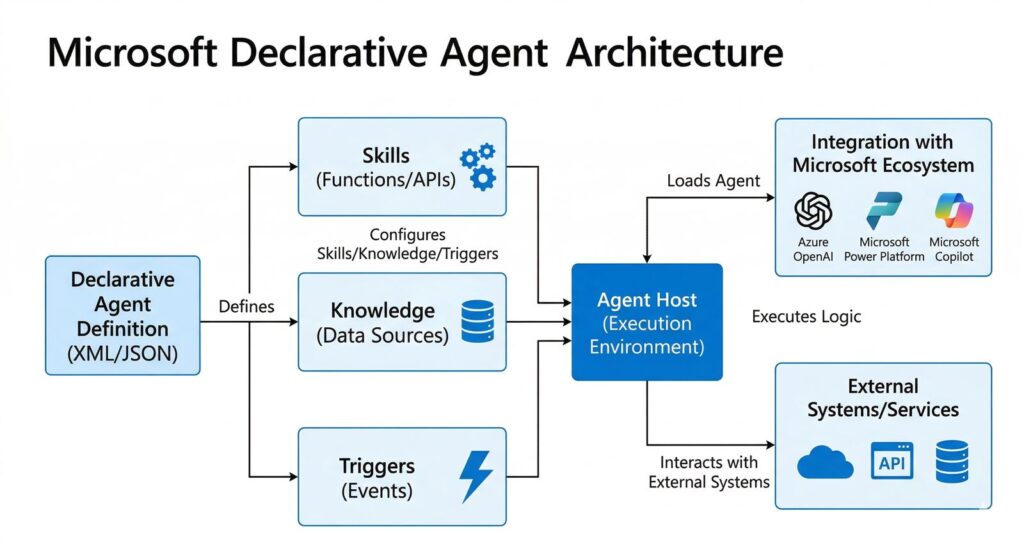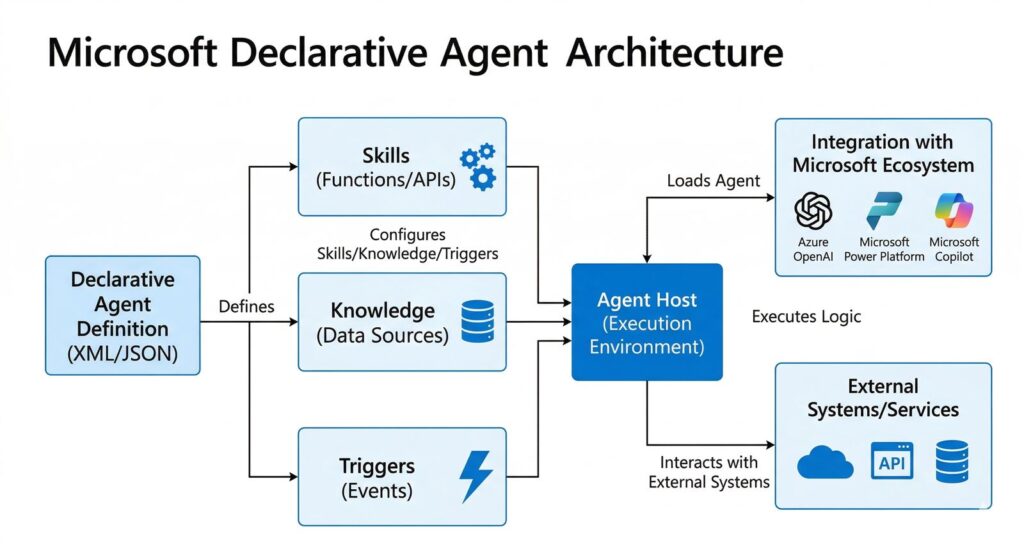
Microsoft declarative agents are interesting because they may be the first agent format many Microsoft 365 teams can actually adopt without building a separate AI stack. Instead of asking users to move into a brand-new tool, they sit closer to the apps people already use in Teams, Outlook, SharePoint, and Microsoft 365 Copilot.
The practical question is not whether declarative agents sound advanced. It is whether Microsoft 365 teams should use them first. For many enterprise groups, the answer is yes when the workflow is narrow, governed, and already living inside Microsoft 365. This guide explains where that fit is strong, where the limits matter, and how to judge a pilot realistically.
- Microsoft says declarative agents use Copilot’s AI infrastructure, model, and orchestrator.
- They can run in Microsoft 365 Copilot and Microsoft 365 apps like Teams, Outlook, and SharePoint.
- They are strongest when the workflow is specialized, governed, and already living inside Microsoft 365.
- They are not the right answer for every automation problem, especially when the workflow needs deeper custom logic or a separate runtime.
- The safest way to adopt Microsoft declarative agents is to start with one narrow pilot before expanding scope.
Table of Contents
- What Microsoft Declarative Agents Actually Are
- Why Teams May Adopt Them First
- Where They Fit Best
- Where the Limits Matter
- 5 Practical Pilot Rules
- FAQ
- Related Reading
- Source Notes
What Microsoft Declarative Agents Actually Are
According to Microsoft Learn, declarative agents are one of the main agent types for Microsoft 365. They use Copilot’s AI infrastructure, model, and orchestrator, and they can be built with low-code tools such as Copilot Studio or pro-code tools such as Visual Studio Code and the Microsoft 365 Agents Toolkit.
That matters because Microsoft declarative agents are not presented as a brand-new isolated runtime. They are a Microsoft 365-native way to shape AI behavior around a specific job, use case, or department need. In practice, that makes them easier to explain to security, IT, and business stakeholders who already think in terms of Microsoft 365 governance and access control.
Microsoft also says declarative agents run in Microsoft 365 Copilot and in Microsoft 365 apps like Teams, Outlook, and SharePoint. That is the big adoption signal. Teams do not have to persuade employees to live in a separate AI product just to get value from the agent.
What that means in practice
- The agent can sit where the work already happens instead of forcing a new workflow home.
- The experience is easier to govern because it lives inside Microsoft 365 controls and admin boundaries.
- The building model is more approachable for teams that want a useful assistant, not a full custom AI platform.
Why Teams May Adopt Them First
The strongest reason to expect early adoption is not that declarative agents are the most powerful option. It is that they are the most practical option for many enterprise teams.
1. Lower implementation friction
Many organizations want a specialist AI assistant for one department: HR, sales, finance, support, or internal operations. Declarative agents are a good fit for that pattern because they can be shaped around a specific role without requiring a large engineering effort before the first version ships.
2. Familiar enterprise surfaces
Microsoft’s own documentation matters here. If the agent runs inside Teams, Outlook, SharePoint, or Microsoft 365 Copilot, adoption is easier because the user does not need to learn a brand-new interface just to ask a question or complete a task.
3. A better governance story
Enterprise AI usually fails on process before it fails on model quality. Declarative agents fit better when a team needs something that can be administered, monitored, and rolled out inside an existing Microsoft 365 environment.
That is why Microsoft declarative agents may become the default first agent for many teams. They are not the most flexible approach, but they are often the least disruptive way to turn a normal workflow into an AI-assisted one.
Where They Fit Best
Declarative agents make the most sense when the goal is to help people do a focused job faster, not to orchestrate a giant autonomous system.
- Policy and knowledge lookup: Teams can build assistants that answer common internal questions from approved enterprise sources.
- Routine work support: A declarative agent can help summarize, triage, or prepare information that already lives in Microsoft 365.
- Department-specific help: HR, IT, sales enablement, or operations teams can create narrow assistants with clear scope.
- Workflow guidance: The agent can guide users through repeatable steps instead of trying to replace the whole process.
If you think about the architecture like a business application layer, declarative agents are closer to a managed front end for common tasks than a fully custom backend service. That is exactly why they are attractive to enterprise teams that want results without months of platform work.
What a realistic first deployment looks like
A useful first deployment is usually boring in a good way. It is not a roaming AI coworker that can do everything. It is a scoped assistant that helps one group answer one class of questions faster. Think of an HR assistant that answers policy questions from approved documents, or an operations assistant that helps a team summarize status updates from SharePoint and Teams. That kind of deployment is easier to approve, easier to test, and easier to improve.
This is where experience matters. The teams that get value early are usually the ones that resist the urge to start with a grand automation vision. They begin with a narrow pain point, prove that the agent saves time without creating governance headaches, and only then expand the scope.
Where the Limits Matter
The same traits that make declarative agents easier to adopt also make them less suitable for some enterprise problems. Microsoft’s FAQ distinguishes declarative agents from custom engine agents, which is a useful clue: if your workflow needs deeper customization, heavier orchestration, or a more specialized runtime, declarative agents are probably not the last stop.
Microsoft’s declarative agent architecture documentation is also clear about technical limits. The agent works within a bounded grounding and tool-call pattern, with limits such as a grounding record cap, a plugin response cap, a token budget, and a timeout window. Microsoft also notes that declarative agents are not a good fit for full-document contexts, large record sets, or long-running processes that exceed those limits.
- Grounding records: up to 50 items.
- Plugin responses: up to 25 items.
- Token budget: 4,096 tokens.
- Timeout: 45 seconds.
In other words, Microsoft declarative agents are a strong fit for governed, scoped, Microsoft 365-native work. They are not a magic answer for every complex automation problem. The more your use case starts to look like a long-running app, a high-complexity integration layer, or a deeply custom AI system, the more you should slow down and evaluate whether a different agent approach is better.
That is a healthy limitation, not a weakness. The enterprise world usually adopts tools faster when the first version is easy to explain, easy to control, and easy to justify to stakeholders.
When Microsoft declarative agents are the wrong fit
They are the wrong fit when the project needs a large custom application behind the scenes, unusually long-running processes, or heavy orchestration across systems that sit outside the normal Microsoft 365 operating model. In those cases, a declarative agent can still be part of the experience, but it should not be mistaken for the whole architecture.
5 Practical Pilot Rules
Use these five rules before you commit to a build. They are the simplest way to decide whether Microsoft declarative agents are the right first agent for your team.
1. Start only if the work already lives in Microsoft 365
Microsoft declarative agents are strongest when the questions, files, and user habits already live in Teams, Outlook, SharePoint, or Microsoft 365 Copilot. If the work happens mostly somewhere else, the fit gets weaker fast.
2. Choose a narrow, repeatable workflow first
The best first pilot is not a broad AI teammate promise. It is one repeatable workflow with clear boundaries, like policy lookup, department guidance, or scoped workflow support.
3. Prefer governance clarity over raw ambition
A practical first agent is usually easier to justify when IT, security, and business owners can describe its scope in one or two sentences. Governance clarity is part of the product value here.
4. Pause if the workflow needs deep orchestration or a separate runtime
If the project starts looking like a long-running application, a complex orchestration layer, or a highly customized runtime, treat that as a signal to evaluate a different agent architecture.
5. Measure the pilot by usefulness and adoption, not autonomy
A good enterprise agent is usually the one that people will actually adopt, not the one that sounds most ambitious in a slide deck. That is why Microsoft declarative agents are interesting: they look like the kind of system a real company can ship, govern, and support.
A practical pilot checklist
- Start with one business unit and one repeatable question type.
- Use only approved Microsoft 365 content sources in the first version.
- Define what the agent should refuse or escalate to a human.
- Measure success as time saved and answer usefulness, not as full autonomy.
- Review failure cases before rolling the agent out more broadly.
FAQ
Are Microsoft declarative agents the same as custom engine agents?
No. Microsoft Learn presents them as different agent types. Declarative agents are the easier Microsoft 365-native path, while custom engine agents are the more customized option for cases that need a separate runtime and deeper control.
Microsoft declarative agents vs custom engine agents: what is the difference?
The main difference is implementation style and flexibility. Microsoft declarative agents are the lighter Microsoft 365-native option for scoped, governed use cases. Custom engine agents are the better fit when the workflow needs deeper custom logic, a separate runtime, or more complex orchestration than the declarative model is meant to handle.
Do declarative agents run in Teams?
Yes. Microsoft says declarative agents run in Microsoft 365 Copilot and Microsoft 365 apps like Teams, Outlook, and SharePoint.
Why would an enterprise choose declarative agents first?
Because they are easier to explain, easier to govern, and easier to adopt inside an existing Microsoft 365 environment. That makes them a practical first step for teams that want real value without a large engineering project.
Are declarative agents good for complex enterprise automation?
They can help with focused workflows, but they are not the best choice when you need heavy orchestration or a highly specialized runtime. Microsoft’s own agents guidance suggests treating them as one option in a broader agent strategy, not the answer to every use case.
What is the best use case for a declarative agent?
The best use cases are scoped, repeatable, and embedded in Microsoft 365. Think internal help, policy guidance, workflow support, or a department assistant that works from approved enterprise context.
What is the simplest Microsoft declarative agents rule for teams?
Start with one narrow Microsoft 365-native workflow, keep governance clear, and avoid use cases that need deep orchestration or a separate runtime.
Related Reading
- ChatGPT File Library Makes ChatGPT Feel More Like a Real Workspace
- Deep Research vs Search vs ChatGPT
- The Claude Web Search Prompt That Forces Live Sources Before Opinion
- More Agents coverage on The Summer AI
Source Notes
This draft is based on official Microsoft Learn documentation only.