Deep research vs search vs ChatGPT is really a workflow choice, not a naming debate. The three modes can look similar in the interface, but they solve different problems: one is best for fast drafting, one is best for current web answers, and one is best for slower, source-backed synthesis.
If you are trying to decide what to use for real work, the fastest rule is this: use standard ChatGPT for thinking and rewriting, use Search for current facts with links, and use deep research when the output needs to survive review or decision-making. This guide breaks down where each mode fits so you do not waste time using a deeper tool than the job actually needs.
- Use standard chat for ideation, quick summaries, rewrites, and short back-and-forth work.
- Use Search when you need recent web information quickly and want links to sources.
- Use deep research when the task needs a documented report, source control, and deeper synthesis across many inputs.
Table of Contents
- Deep Research vs Search vs ChatGPT: What Each Mode Does
- Speed vs Depth Comparison
- 7 Rules for Choosing the Right Mode
- When Standard Chat Is the Right Tool
- When Search Is Better
- When Deep Research Is Worth the Wait
- Access and Pricing
- Best For
- Alternatives and Switching Rules
- FAQ
- Related Reading
- Source
Deep Research vs Search vs ChatGPT: What Each Mode Does
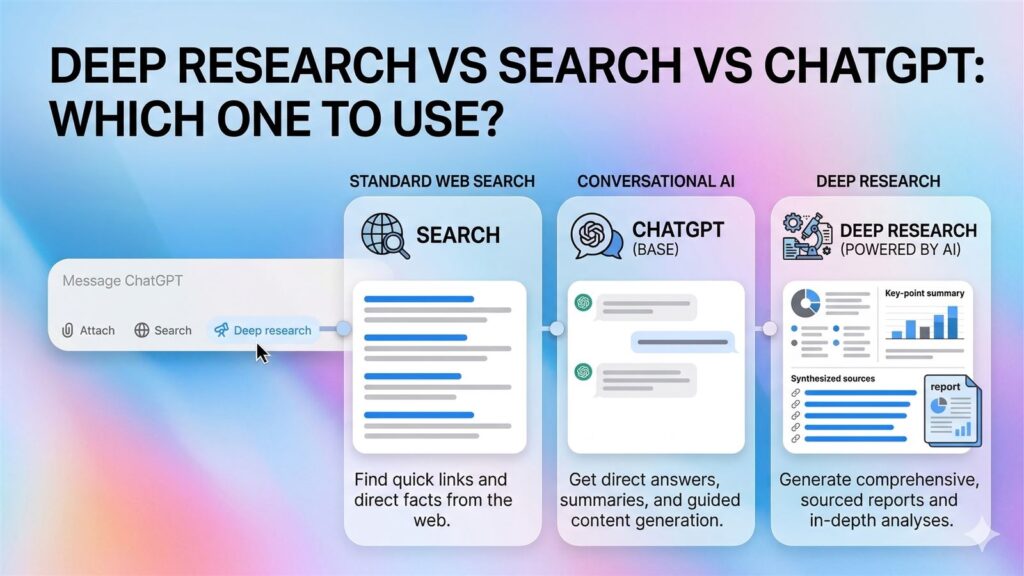
Standard ChatGPT is still the fastest option when the job mostly depends on reasoning, rewriting, brainstorming, outlining, or making sense of information you already have in the conversation. It is the right default for short conversations and tasks that do not need fresh web retrieval or a long documented synthesis.
ChatGPT Search adds timely web retrieval. OpenAI says ChatGPT can automatically search the web if your question would benefit from it, and users can also trigger Search manually from the tools menu. Search is designed for fast answers with links to sources, which makes it the better tool when freshness matters more than exhaustive analysis.
Deep research is the slowest but deepest mode. OpenAI’s help documentation says it is for multi-step or in-depth questions that require aggregation and synthesis across multiple sources, especially when you want explicit control over which sources are used. It produces a more detailed, documented report instead of a quick answer.
Speed vs Depth Comparison
| Mode | Best Use | Speed | Depth | Output Style |
|---|---|---|---|---|
| Standard Chat | Drafting, thinking, rewriting, quick summaries | Fastest | Low to medium | Conversational answer |
| Search | Recent facts, web links, quick source-backed answers | Fast | Medium | Short answer with links |
| Deep Research | Documented reports, synthesis, source-heavy analysis | Slowest | Highest | Detailed report with citations or source links |
7 Rules for Choosing the Right Mode
If you only remember one framework from this article, make it this deep research vs search vs ChatGPT checklist.
- Use standard chat first when the task is still fuzzy and you are shaping the question.
- Use Search when freshness matters more than depth and you want links fast.
- Use deep research when the output needs to survive review, sharing, or decision-making.
- Do not spend deep research time on a question that Search could settle in one pass.
- Do not trust standard chat alone for time-sensitive facts that need current web evidence.
- Escalate from standard chat to Search to deep research as the decision cost gets higher.
- Choose the mode that matches the job, not the mode that sounds the most advanced.
When Standard Chat Is the Right Tool
Standard chat is better than people think because not every task deserves a web lookup or a full research run. If you are drafting an email, cleaning up a paragraph, generating options for a title, summarizing notes you already pasted in, or pressure-testing an idea, standard chat is usually the most efficient mode.
It is also the right tool when the problem is still fuzzy. Deep research works best when the question is shaped enough to deserve a plan. Search works best when the answer exists somewhere current on the web. Standard chat is better when you are still figuring out what you mean.
The common mistake is treating standard chat like a weak version of the other two modes. It is not. It is the fastest thinking surface in the product. That matters when iteration speed is the real priority.
When Search Is Better
Search is the best fit when freshness matters but the job is still fairly compact. OpenAI says Search can automatically kick in when the prompt might benefit from web information, and users can also choose it directly. The goal is a fast, timely answer with links, not a long report.
Use Search for things like:
- current product updates
- today’s pricing or availability questions
- recent announcements
- quick comparisons that need fresh links
- fact checks where you want source visibility fast
If you only need a few current facts and want to keep moving, Search is usually the right balance. It is much better than running a full deep research task just to answer a question that could have been settled in one short web-backed response.
When Deep Research Is Worth the Wait
OpenAI’s help materials draw the line clearly. Deep research is for multi-step or in-depth questions that require aggregation and synthesis across multiple sources. It is especially useful when credibility and traceability matter, or when the task needs more than one source type.
That makes deep research worth using for:
- decision memos
- market or competitor summaries
- source-backed explainers
- complex background research
- report drafts that need citations or source links
OpenAI also says deep research can use the public web, uploaded files, and supported connected apps when relevant. That changes the value proposition. The mode is not just “search, but longer.” It is closer to a guided research workflow.
The main trade-off is time. OpenAI explicitly says that if time is critical, users should choose Search or standard chat for faster responses and save deep research for in-depth analysis. That single rule will prevent a lot of wasted time.
Access and Pricing
This comparison matters because access is not identical across the three modes.
- Standard chat: available as the default ChatGPT experience, with model and usage differences depending on plan.
- Search: OpenAI’s current help article says ChatGPT Search is available to Free, Plus, Team, Edu, and Enterprise users, and even logged-out Free users can access it.
- Deep research: usage varies by plan. OpenAI’s help center says the in-product usage counter shows remaining tasks, and plans with fixed monthly allowances reset every 30 days from first use.
That means the practical pricing rule is simple. Standard chat is the lowest-friction option, Search is the easiest way to add fresh web context, and deep research is the premium attention budget inside the product. Do not spend deep research tasks on work that only needs Search.
Best For
Use standard chat when:
- you are drafting or rewriting
- you want quick reasoning help
- the source material is already in the chat
- you need speed more than citation depth
Use Search when:
- the answer depends on recent web information
- you want source links fast
- the task is still small enough for a short summary
- you do not need a full report
Use deep research when:
- the task needs multiple sources synthesized together
- the output should feel more like a documented report
- you need explicit source control
- the question is complex enough to justify slower turnaround
Alternatives and Switching Rules
The useful way to think about alternatives here is not “which separate product should I buy?” but “which mode should I switch to next?” In most deep research vs search vs ChatGPT decisions, the best answer is a mode switch, not a new tool purchase.
- If standard chat starts guessing about fresh facts, switch to Search.
- If Search gives you enough links but not enough synthesis, switch to deep research.
- If deep research is too slow for the job, fall back to Search or standard chat.
- If the question is still vague, start in standard chat before spending Search or deep research time.
That is the core judgment this article should help readers make. The best tool is not the deepest one. It is the one that matches the decision cost of the task.
FAQ
What is the simplest rule for choosing between Search and deep research?
Use Search for quick facts and recent web answers. Use deep research for slower, documented, multi-source analysis.
When is standard chat better than both?
Standard chat is better when you are brainstorming, rewriting, summarizing pasted material, or clarifying a question before you know whether you even need web retrieval.
Does deep research replace Search?
No. OpenAI’s own guidance says Search is better when time is critical, while deep research is for deeper analysis and synthesis. They solve different jobs.
What is the simplest deep research vs search vs ChatGPT rule for beginners?
Start with standard chat for drafting and thinking, move to Search for current web answers, and only use deep research when the result needs documented synthesis from multiple sources.
Key Takeaways
- Standard chat is for speed and iteration.
- Search is for fast, current answers with links.
- Deep research is for multi-step, source-heavy reports.
- The most common mistake in deep research vs search vs ChatGPT decisions is using a deeper mode than the task actually needs.