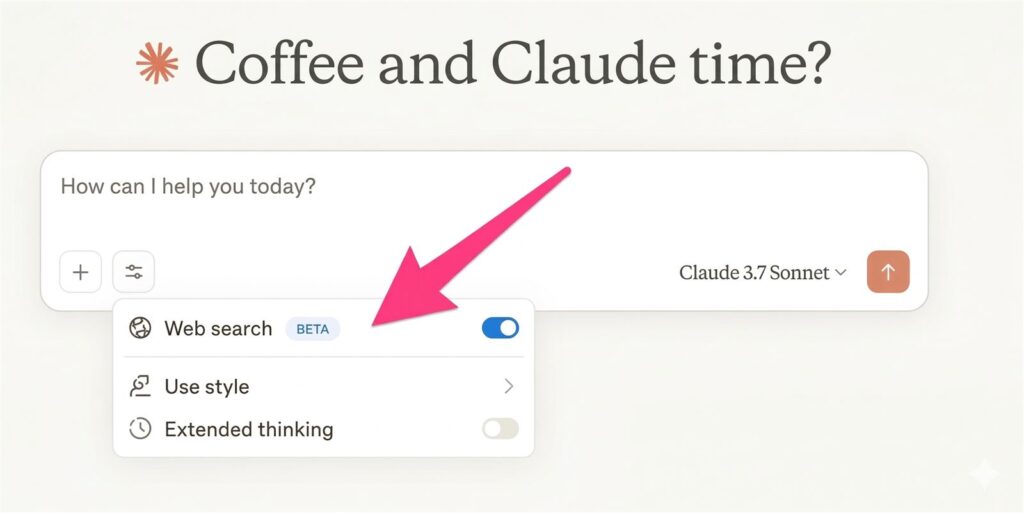
Claude web search prompt is one of the easiest ways to get fresher, more trustworthy answers from Claude when the question depends on current facts, product updates, or policy changes. The trick is not simply telling Claude to search. The trick is making the model check live sources before it starts explaining what they mean.
That order matters because many weak AI answers sound polished before they are well grounded. A better Claude web search prompt tells Claude to gather live sources, summarize what those sources actually say, and only then explain the takeaway. That produces cleaner writing, clearer citations, and fewer unsupported claims.
- Use Claude web search when the answer depends on current information that can be verified online.
- Ask for sources first, then facts, then interpretation.
- Use XML tags to keep the prompt ordered and easier for Claude to follow.
- Switch to Research when the task is broader than a quick source-backed answer.
Table of Contents
- What This Claude Web Search Prompt Does
- Why Live Sources Before Opinion Work Better
- Copy-Paste Prompt Template
- How To Use It In Practice
- When To Use Web Search vs Research
- FAQ
- Related Reading
- Source
What This Claude Web Search Prompt Does
This prompt is designed to make Claude behave like a disciplined research assistant instead of a fast opinion engine. Anthropic’s help center frames web search as the right choice when a question benefits from current information and source-backed answers. That is exactly where this prompt fits.
It works by separating the workflow into three stages. First, Claude searches the web and finds the most relevant live sources. Second, it summarizes the source evidence in a clean, factual way. Third, it explains the conclusion or recommendation only after the evidence is on the table.
That structure is useful because many AI failures are not really about intelligence. They happen when the model starts judging before it has finished collecting evidence. A good Claude web search prompt prevents that by forcing the order of operations.
Why Live Sources Before Opinion Work Better
Live sources before opinion is a simple rule, but it changes the quality of the output fast. If Claude is allowed to interpret first, it can drift into confident but unsupported language. If Claude is required to report sources first, the answer becomes easier to audit.
This is especially important for topics with a freshness problem. Product launches, policy changes, pricing pages, model updates, and feature rollouts all become misleading if the answer is not tied to the latest source. The web search flow gives Claude a way to ground the response before it starts analyzing.
Anthropic also recommends using the right tool for the depth of the task. Web search is good for faster, source-backed answers. Research is better when the question needs a deeper investigation and a more substantial synthesis. So the prompt should not just ask for search. It should also tell Claude when search is enough and when to escalate.
Why XML tags help
Anthropic’s prompt engineering docs recommend XML tags as a way to structure instructions and make complex prompts easier to follow. For this use case, XML tags are ideal because they let you separate search rules, evidence rules, and output rules without turning the prompt into a wall of text.
In practice, that means Claude is less likely to miss the priority order. It sees the search step, then the evidence step, then the opinion step. That is exactly the kind of structure you want when the topic is current and source quality matters.
Copy-Paste Prompt Template
Here is a practical Claude web search prompt you can reuse. It is built to force live sources before opinion and to keep the final answer clean and auditable.
Copy and paste this Claude web search prompt:
<task>
You are answering a question that may depend on current information.
Search the web first, then answer.
Do not give your opinion until you have listed the live sources you used.
</task>

<question>
[Insert the exact question here]
</question>

<instructions>
1. Search the web first and prefer official or primary sources when possible.
2. List the live sources you used before any interpretation.
3. Summarize the facts in plain language.
4. Separate confirmed facts from analysis.
5. If the answer depends on freshness, use concrete dates.
6. If the topic needs a deeper investigation than a quick search, say so and recommend Research.
7. Do not hide uncertainty.
8. Do not start with opinion or speculation.
</instructions>

<output_format>
Sources used:
- [source 1]
- [source 2]
- [source 3]

Confirmed facts:
- ...

Interpretation:
- ...

What is still uncertain:
- ...

Bottom line:
- ...
</output_format>

<tone>
Clear, calm, and factual. No hype. No filler.
</tone>
How To Use It In Practice
The best way to use this Claude web search prompt is to give it one clear question at a time. A single question produces a cleaner search path and a cleaner answer. If you stack too many questions into one prompt, Claude can still search, but the output becomes harder to audit.
When you care about freshness, say so directly. Use words like “current,” “latest,” “live sources,” or “updated policy” so Claude knows it needs to verify the answer against the web instead of relying on older memory. If the question is about a launch date, pricing change, or feature rollout, ask for dates in the answer too.
It also helps to specify the source type you want. For example, ask Claude to prefer official docs, help center pages, product blogs, or release notes first. That keeps the answer closer to the truth and reduces the chance that a secondary article frames the story too aggressively.
How to customize the template without breaking it
The most common mistake is adding too many instructions at once. If you overload the prompt with formatting rules, persona rules, brand voice rules, and five separate questions, Claude may still search well but the answer becomes harder to inspect. The better approach is to keep the search logic stable and only customize three fields: the exact question, the preferred source type, and the output format.
- Change the question block for the exact issue you want checked.
- Change the instructions block only when you need a stronger source preference.
- Change the output_format block when you want a memo, comparison, or checklist instead of a plain answer.
That way the prompt stays readable, and the user can still tell whether Claude actually followed the “sources first, interpretation second” rule.
A filled example for a real task
If you want to verify something concrete, do not leave the template abstract. Fill it with one current question. Here is a simple example for a product-update check.
<task>
Search the web first, then answer.
Use official help pages or release notes when possible.
Do not interpret before you show the live sources.
</task>

<question>
What changed in Claude web search this month, and what should ordinary users know before relying on it?
</question>

<output_format>
Sources used
Confirmed facts
What changed
What users should watch out for
Bottom line
</output_format>
Mistakes that weaken this prompt fast
- Asking five unrelated questions in one run.
- Not specifying a preferred source type when accuracy matters.
- Using web search for a task that clearly needs a deeper Research workflow.
- Trusting the summary without skimming the cited sources yourself.
Best use cases
- Product update summaries
- Feature comparison questions
- Policy and pricing checks
- Launch-date verification
- Short research notes that still need citations
When To Use Web Search vs Research
Claude web search is the right tool when you want a fast answer with live sources attached to it. If your question is straightforward and the evidence lives in a handful of current pages, web search is usually enough. That is the sweet spot for a prompt like this.
Research is the better choice when the question is broader, more ambiguous, or requires a deeper synthesis across many sources. If the task is closer to “build me a full report” than “verify this current claim,” then asking for web search alone is too shallow.
The practical rule is simple. Use web search for verification and quick source-backed answers. Use Research for deeper analysis, larger source sets, and multi-step investigations. A strong prompt should make that distinction obvious instead of pretending every question needs the same workflow.
Why This Prompt Is Better Than a Generic Search Request
A generic prompt like “search the web and answer this” is better than no search at all, but it still leaves the order of work vague. Claude may search, summarize, and interpret in a way that blurs evidence and opinion together. That is where trust starts to erode.
This Claude web search prompt fixes that problem by making the output structure explicit. Sources come first. Facts come second. Opinion comes last. That small change makes the result easier to scan, easier to fact-check, and easier to reuse in a post, memo, or client note.
For content work, that separation is especially useful. Writers can pull the source list into a draft, keep the facts tight, and decide what interpretation deserves a stronger claim. In other words, the prompt does not just improve answer quality. It also improves editorial control.
FAQ
Is Claude web search the same as Research?
No. Web search is better for faster, source-backed answers. Research is better when the question needs a deeper investigation and more synthesis across sources.
Why should I force live sources before opinion?
Because it reduces unsupported claims. If the model has to show evidence first, it is much easier to see whether the conclusion is actually grounded in current sources.
Why use XML tags in the prompt?
XML tags help Claude follow a strict order of instructions. Anthropic’s prompt engineering guidance recommends structured prompts like this when you want clearer control over the workflow.
What kinds of questions work best with this prompt?
Anything current works well: product updates, policy changes, pricing checks, feature comparisons, and launch-date verification. Those are the cases where live sources matter most.
Should I trust the answer without checking the sources?
Not completely. The whole point of this prompt is to make source checking easier. The final answer is more trustworthy when you skim the sources yourself and confirm the key claims.
What makes a Claude web search prompt better than a normal search request?
A better Claude web search prompt gives the model an order to follow. Instead of “search and answer,” it says “search first, show sources, summarize facts, then interpret.” That structure makes the output easier to verify and much easier to reuse in research notes, memos, or editorial drafts.
Related Reading
- Deep Research Prompt Template for Trustworthy AI Reports
- Deep Research vs Search vs ChatGPT
- ChatGPT File Library Makes ChatGPT Feel More Like a Real Workspace
- More Prompts coverage on The Summer AI